
Free mileage tracker for food and grocery delivery drivers
Deliver meals with DoorDash, Uber Eats or Grubhub, or groceries with Instacart and Walmart Spark? One workday creates many short drives. Keep them in one reviewable log, without another subscription.
If you drive for DoorDash, Uber Eats, Instacart or several gig apps at once, use one mileage log for the whole workday. Record the drive, review Business versus Personal, and keep enough detail to explain the purpose later. MileFree is FULL FREE: no Premium tier, subscription or app-imposed monthly trip cap.
MileFree features shown in this article
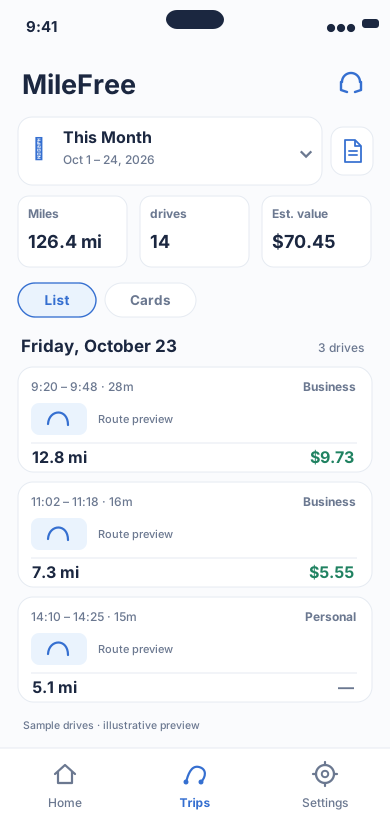
Date range, miles, drives and reviewable trip history.
Flutter UI: HistoryScreenOpen larger preview ↗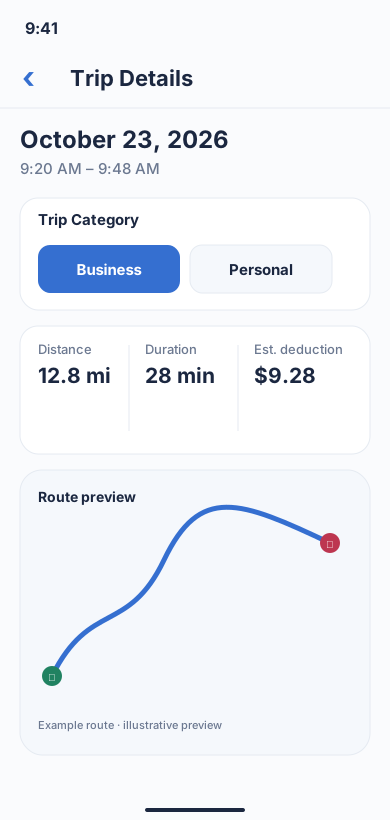
A real MileFree workflow: classify one recorded trip as Business or Personal and review distance, duration and estimated value.
Flutter UI: TripScreenOpen larger preview ↗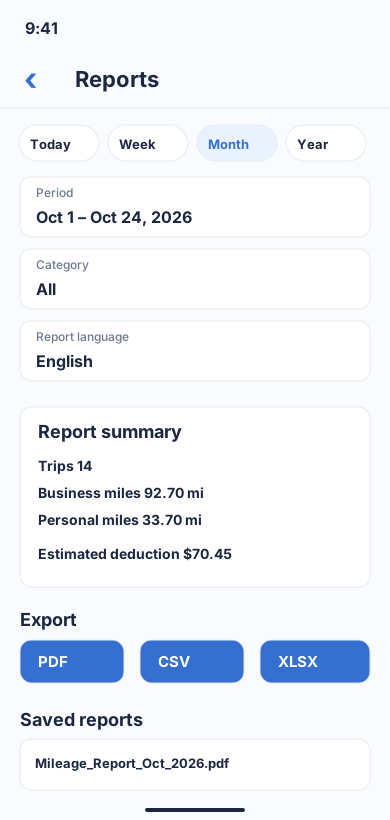
Choose a period and category, review business/personal totals, then download a report in PDF, CSV or XLSX format.
Flutter UI: ReportBuilderScreenOpen larger preview ↗Illustrative previews based on the app interface, with example data. These are not actual iPhone screenshots; the design may change. Preview text is in English.
The short story behind FULL FREE
I searched Google for a free mileage tracker because I needed a simple tool for real work. I opened the top results, installed several apps and quickly learned that “free” often meant a trial, a limited number of trips or a subscription once you actually used it every day.
That was the moment the idea became simple: build the mileage tracker I expected to find in the first place. Not “free to download.” FULL FREE to use.
One delivery shift can span several apps
A driver may start with DoorDash, switch to Uber Eats during a slow period, accept an Instacart order, then drive to another busy area. A mileage log should not depend on which delivery app is open.
The useful record is the driving itself: date, route, distance and business purpose. Platform earnings screens are useful for income, but your mileage history should stay consistent across the whole shift.
Food and grocery delivery: how to keep one mileage log
Food orders (DoorDash, Uber Eats and Grubhub): review driving to pickups, customer drop-offs and work-related travel between orders. A delivery-app earnings summary does not replace a complete mileage history.
Grocery orders (Instacart and Walmart Spark): review store pickups, shop-and-deliver trips, customer stops and work-related trips toward the next assignment. Separate personal detours.
Example only: 2.1 miles to a restaurant pickup + 4.6 miles to the customer + 3.4 miles between grocery assignments + 5.0 miles delivering groceries = 15.1 recorded miles. Confirm the purpose of every leg; recording it does not automatically make it deductible.
MileFree records iPhone trips independently; it does not connect to these delivery accounts or import orders. Allow location and motion permissions and check for short, missed or merged trips after the shift.
What “free” can mean for a busy delivery driver
| Model | What happens | Why it matters |
|---|---|---|
| Free trial | Full access for a short period, then payment | The tracker can become a recurring cost after you build a habit around it. |
| Trip-limited free plan | Only a fixed number of automatic drives are included | Delivery drivers can create many short trips in a single shift. |
| Manual-only free tracking | You must remember to start or classify trips yourself | Missed taps can become missing mileage records. |
| FULL FREE MileFree | Mileage features stay in the same free app | No Premium, subscription or monthly trip-count paywall. |
Why accurate mileage matters in 2026
For U.S. business driving, the IRS standard mileage rate is 72.5 cents per mile for January 1–June 30, 2026 and 76 cents per mile for July 1–December 31, 2026.
That does not mean every mile a delivery driver records is automatically deductible. Commuting and other rules still matter. The point of the tracker is to preserve a timely, reviewable record instead of reconstructing the year from memory.
A practical delivery-driver workflow
- Record the drivingLet the tracker capture the route, or use manual Start and Finish when needed.
- Keep one historyUse the same log while moving between DoorDash, Uber Eats, Instacart and other work apps.
- Review the shiftCheck short trips, merged legs, missing endpoints and Business versus Personal classification.
- Keep the purposeRetain enough context to explain why the trip was business-related if you later need a tax or reimbursement record.
Why MileFree fits high-trip-count work
Delivery drivers should not have to count how many “free trips” remain before accepting the next order. MileFree is being built around the opposite product decision: the mileage-tracking feature set is FULL FREE.
That includes automatic and manual trips, history, Business and Personal classification, summaries, reports and odometer records. MileFree is currently available as a public iPhone beta through TestFlight while the first App Store release is being prepared.
FAQ: DoorDash, Uber Eats and Instacart mileage tracking
What is the best free mileage tracker for DoorDash drivers?
Choose a tracker that fits a high number of short trips, lets you review Business versus Personal driving, and does not hide the workflow you need behind a trip cap. MileFree is designed around that FULL FREE model.
Can I use one mileage tracker for DoorDash, Uber Eats and Instacart?
Yes. A separate mileage log can record the driving while you switch between delivery platforms. Review the final classification and purpose of each trip.
Does a delivery app replace a mileage log?
Do not assume an earnings or platform summary is the same as your complete business-driving record. Keep your own mileage history and compare it with the records you need for tax or reimbursement purposes.
Are miles between deliveries deductible?
Eligibility depends on the facts and tax rules. Keep the record, then apply the relevant IRS rules or professional advice rather than asking the tracker to decide for you.
Parcel and package delivery are a different topic. See the separate guides below.
Instacart mileage: which miles to track? →
Help test MileFree while making real deliveries
Try the public iPhone beta on a real shift. Your feedback helps improve trip tracking and reports.
Official tax references
IRS Publication 463: Travel, Gift, and Car Expenses
MileFree organizes mileage records; it does not determine tax eligibility or provide tax advice.
DoorDash, Uber Eats and Instacart are trademarks of their respective owners. MileFree is not affiliated with or endorsed by those companies.