
Amazon Flex mileage tracker: keep every delivery block reviewable
An Amazon Flex block can include the pickup station, a string of package stops, a return to the station and a drive to your next job. Use one mileage history so those legs do not disappear.
Record driving during Amazon Flex work in a separate mileage tracker. Review the beginning and end of each leg, record its business purpose and distinguish commuting or personal trips. MileFree is FULL FREE: no subscription, Premium tier or monthly trip cap.
MileFree features shown in this article
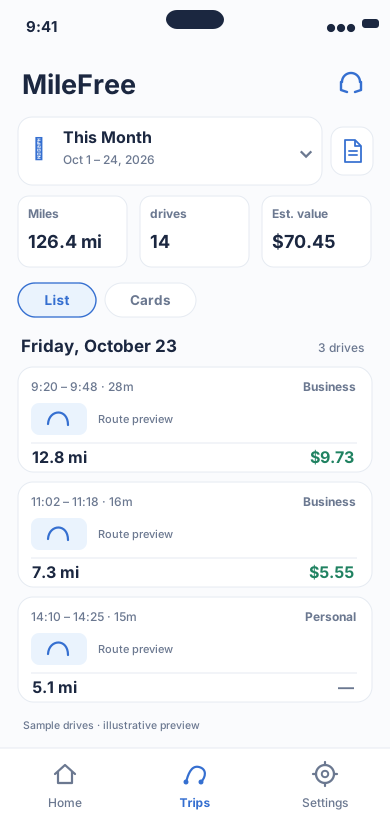
Date range, miles, drives and reviewable trip history.
Flutter UI: HistoryScreenOpen larger preview ↗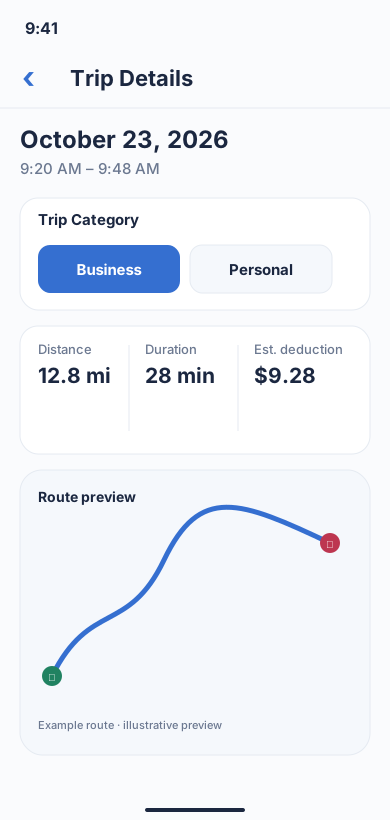
A real MileFree workflow: classify one recorded trip as Business or Personal and review distance, duration and estimated value.
Flutter UI: TripScreenOpen larger preview ↗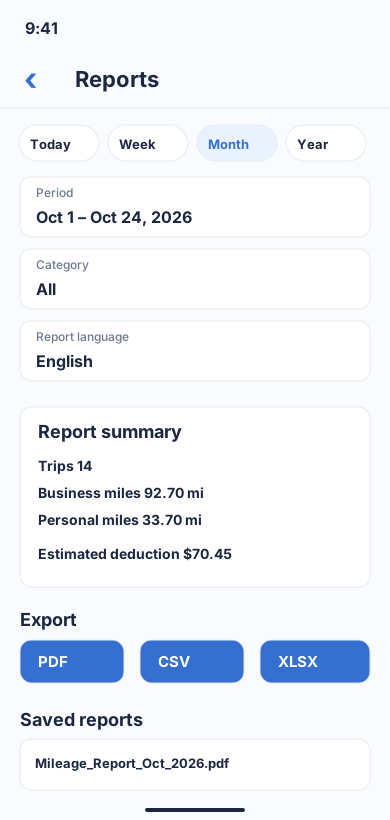
Choose a period and category, review business/personal totals, then download a report in PDF, CSV or XLSX format.
Flutter UI: ReportBuilderScreenOpen larger preview ↗Illustrative previews based on the app interface, with example data. These are not actual iPhone screenshots; the design may change. Preview text is in English.
Which Amazon Flex miles should you track?
Log the pickup station, package deliveries, work-related travel between stops and any actual return trip. The mileage record should show date, distance, start and destination, plus why the drive was for work.
A trip from home to the first station, the last drive home, or repositioning may be treated differently depending on your tax facts. Do not mark every recorded mile as deductible automatically.
A realistic Amazon Flex block: station, route and returns
Illustrative example only: Station → delivery area (12.4 mi), stops within the area (18.6 mi), delivery area → station for a required package return (9.1 mi). Recorded total: 40.1 mi before checking personal diversions and eligibility. These are sample figures, not live route estimates.
Some routes involve apartment buildings, parking garages or brief stops. Background GPS can merge stops or miss a leg; review the route against the block and delivery history.
Why the Amazon Flex app is not your complete tax log
A delivery offer, navigation display or block payment is not automatically the same as a contemporaneous mileage log. Keep a separate record that survives app switching and lets you review each business purpose.
MileFree does not import Amazon Flex orders or connect to an Amazon account. It records phone-based driving independently when the necessary location permissions are enabled.
FREE vs FULL FREE for high-mileage drivers
Some mileage products have free trials, automatic-trip caps or advanced reports reserved for paid subscriptions. Always verify each provider’s current pricing and supported features.
MileFree’s FULL FREE commitment is no Premium or Pro tier, subscription, paid report unlock or app-imposed trip-count cap. Its public iPhone beta is available via TestFlight; the first App Store release is still in preparation.
Practical four-step mileage workflow
- Start with a block
Confirm location and motion permissions; use automatic recording or manual Start/Finish.
- Record actual legs
Capture station drives, deliveries and any work-related return.
- Review after the shift
Check missing GPS legs, personal detours, duplicates and Business/Personal labels.
- Keep supporting context
Retain dates, block details and work reasons alongside reviewed mileage records.
IRS mileage recordkeeping
The IRS mileage rate and recordkeeping rules can change by tax year. Check the official IRS standard mileage rates and Publication 463 before preparing a return.
Frequently asked questions
Does Amazon Flex track every mile I need for taxes?
Do not assume a platform display is a complete tax log. Keep independent records of actual driving and business purposes.
Should I track the drive to an Amazon Flex pickup station?
Record it, but determine whether it is deductible under the commuting and business-travel rules for your circumstances.
Can MileFree automatically import Amazon Flex blocks?
No. MileFree is a separate mileage tracker; it does not currently integrate with Amazon Flex orders or payments.
Can I use MileFree for Amazon Flex and DoorDash on the same day?
Yes, the same phone-based mileage history can capture driving while you work on different platforms; review the purpose of each trip.
Track Amazon Flex driving without another monthly bill.
Easy. FULL FREE. Safe. Reliable.
MileFree TestFlight beta →Independent guide. Amazon Flex is a trademark of its owner. MileFree is not affiliated with Amazon. Recorded miles are not automatically tax-deductible.
← Back to blog