
Mileage tracker for self-employed workers: keep a useful business mileage log
Freelancers and independent workers need mileage records they can explain, not just a total. Here is how to document client drives, supply stops and personal trips.
Who needs a self-employed mileage log?
Freelancers, consultants and 1099 professionals may drive to clients, temporary workplaces or suppliers. Each trip needs a date, a destination and a meaningful reason, not simply the label Business.
A 1099 tax form does not automatically make every drive deductible. Work purpose, commuting and the method used to calculate expenses matter.
Example mileage log for an independent worker
Illustrative entries: October 12, client consultation, 8.2 miles; client to supplier, 4.6 miles; supplier to personal errand, 7.1 miles marked Personal. Recorded total: 19.9 miles.
These are example distances, not GPS measurements and not a 19.9-mile tax deduction. Keep the actual starting point, endpoint and the reason for each drive.
Example mileage entries (illustrative)
| Route | Distance | Purpose |
|---|---|---|
| Client visit | 8.2 mi | Business purpose to verify |
| Client → supplier | 4.6 mi | Business purpose to verify |
| Supplier → personal errand | 7.1 mi | Personal |
Sample values only — not actual MileFree GPS readings or automatically deductible miles.
MileFree features shown in this article
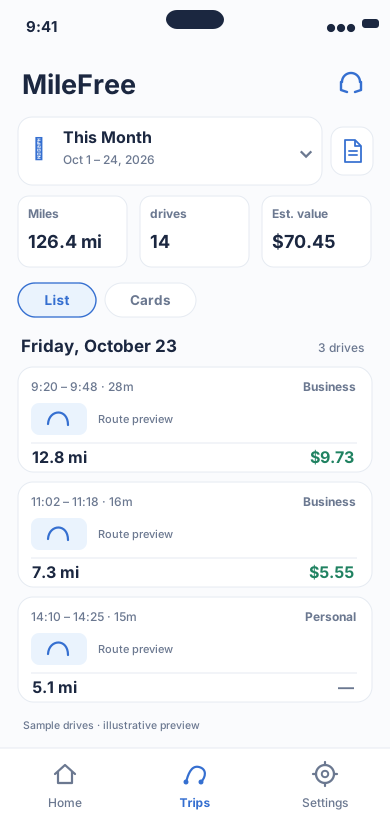
Date range, miles, drives and reviewable trip history.
Flutter UI: HistoryScreenOpen larger preview ↗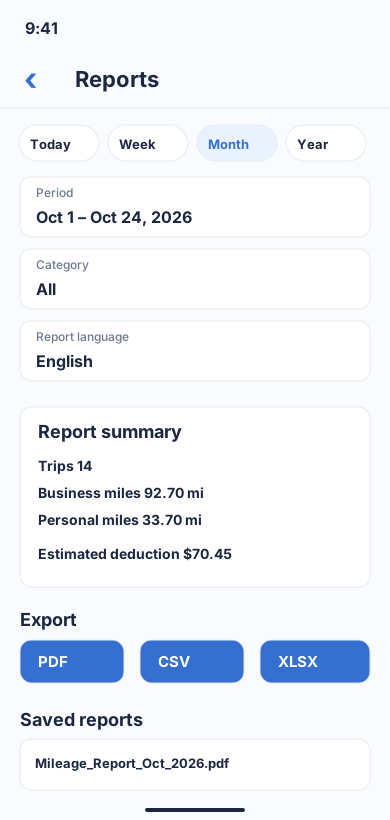
Choose a period and category, review business/personal totals, then download a report in PDF, CSV or XLSX format.
Flutter UI: ReportBuilderScreenOpen larger preview ↗Illustrative previews based on the app interface, with example data. These are not actual iPhone screenshots; the design may change. Preview text is in English.
Commuting versus business trips
Ordinary travel from home to a regular workplace is generally commuting and not deductible. Qualifying home offices and temporary job sites can be different; the facts matter.
Do not set a mileage tracker to treat every first drive from home as a deduction. Review IRS Publication 463 and seek professional advice for your circumstances.
Review the log before monthly totals
Compare trips against client appointments and invoices. Verify missing legs, duplicates, inaccurate GPS endpoints and classification before reporting a business-mileage total.
Keep supporting records and notes. A Business category inside an app helps organize records but is not IRS approval of a deduction.
Automatic mileage tracking on iPhone
MileFree is designed around automatic trip detection when iPhone motion and location permissions allow it. Manual Start and Finish controls provide an alternative.
Short drives and GPS endpoints can be missed, especially in the background. Review each trip. MileFree is not yet presented as available for public App Store download.
Keep clients and work locations private
A trip log may reveal customer addresses and daily work habits. Current MileFree core trip and odometer data is stored locally on iPhone without requiring a MileFree account.
Anonymize any sample log or screenshot you share publicly, and keep your own supporting records secure.
A practical four-step workflow
- CaptureRecord each journey and its date, start and end.
- ExplainAdd the business reason or personal purpose.
- ReviewCheck GPS accuracy, duplicates and commuting rules.
- SummarizeTotal reviewed business miles and retain supporting notes.
MileFree plans free mileage-tracking features at public launch, without requiring a monthly subscription for basic driving records.
Public iPhone beta is available through Apple TestFlight; the first App Store release is in preparation.
For a product walkthrough of Business / Personal categories, commute adjustments and reports, see the free business mileage tracker for iPhone.
Official IRS guidance
IRS Publication 463: Travel, Gift, and Car Expenses
A mileage app does not determine tax eligibility; check the rules and your circumstances.