
Handyman mileage tracking: what to record between jobs
One repair, a stop for missing parts, another customer and a callback. By Friday, those little drives are hard to remember. Here is a simple way to keep a useful record.
A workday is not one round trip
You finish a faucet repair, drive to the hardware store for a missing fitting, head to a second customer and return for a callback. It all feels like one workday, but the log should show the separate drives.
Start with the route, not a guessed daily total. The sample entries below show a format you can use; the distances are illustrative, not actual GPS readings.
Write down why you stopped for supplies
“Hardware store” is less useful than “fittings for the kitchen repair, job 104.” Keep the store receipt or work order with your business records so the purpose is clear later.
If you return for a part tomorrow, record that trip on tomorrow’s date. A grocery stop on the way home is personal; it should not automatically be included in business miles.
Example mileage entries (illustrative)
| Route | Distance | Purpose |
|---|---|---|
| Job A → hardware store | 4.6 mi | Buy materials |
| Hardware store → Job B | 7.1 mi | Second customer |
| Job B → callback | 3.4 mi | Follow-up visit |
Sample values only — not actual MileFree GPS readings or automatically deductible miles.
Classify each leg before using a mileage total
Record the actual date, start, destination and job reference. These are general examples, not verified GPS journeys or automatic tax deductions.
- Home → first customer: review commuting and home-office rules; this is not automatically deductible.
- Customer → hardware store → next customer: note the parts purchased and job number, then verify business purpose.
- A grocery stop or other personal detour: separate it from the work-related portion.
- A callback on a different day: record the real date and link to its original work order.
Use IRS Publication 463 and the facts of your situation to decide eligibility. MileFree only helps organize mileage records.
MileFree features shown in this article
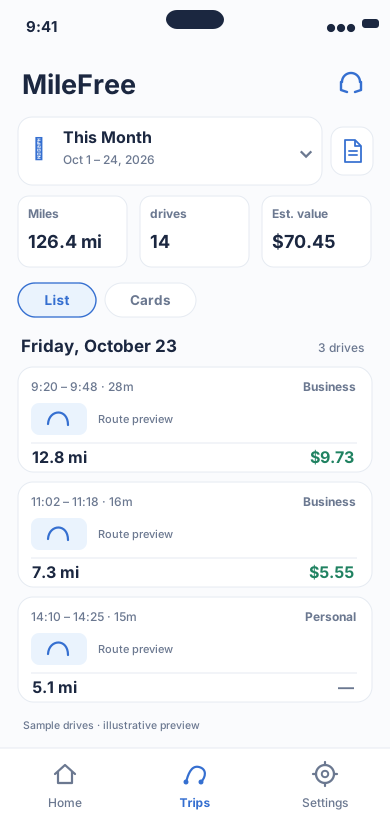
Date range, miles, drives and reviewable trip history.
Flutter UI: HistoryScreenOpen larger preview ↗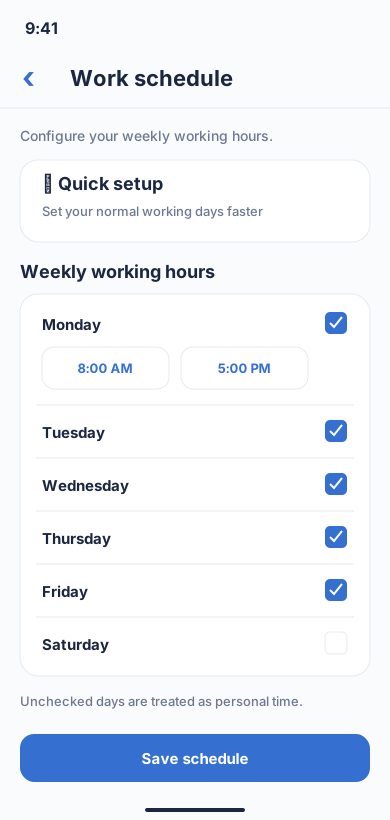
Weekly work hours used by tracking settings.
Flutter UI: WeeklyScheduleScreenOpen larger preview ↗Illustrative previews based on the app interface, with example data. These are not actual iPhone screenshots; the design may change. Preview text is in English.
Connect each trip to a job ticket
Keep the date, origin, destination, distance and business purpose. A related invoice or calendar appointment can help explain the route months later. A label saying “Business” is not enough context by itself.
MileFree helps keep and review a driving history. It is not a handyman dispatch, billing or receipt-storage system, so keep those supporting documents separately.
First customer, commuting and 2026 IRS rates
Ordinary driving between home and a regular workplace is generally commuting. A qualifying home office or temporary work site can change the analysis, so do not assume that every drive from home to a customer is deductible.
For qualifying business miles, the optional IRS standard mileage rate is 72.5 cents per mile for January–June 2026 and 76 cents for July–December 2026. That rate calculates a potential expense deduction, not a cash refund. See the IRS sources below.
A short weekly check beats a year-end reconstruction
Once a week, compare recorded drives with appointments and receipts. Pay special attention to quick supply runs and back-to-back jobs: a phone can miss a short leg or put the GPS endpoint in the wrong place.
Automatic tracking can save taps, but it is not perfect. MileFree also has manual Start/Finish controls. Check the actual route and Business / Personal classification before using a total.
Where MileFree fits
MileFree is FULL FREE: no subscription, Premium tier or trip-count paywall for mileage features. The public iPhone beta is available through TestFlight; the first App Store release is still being prepared.
Use the app to review drives and separate work from personal use. Keep your own supporting job records; an app cannot decide whether the IRS accepts a specific deduction.
A practical four-step workflow
- CaptureRecord the date and each drive, including short supply runs.
- ExplainNote the job or customer behind each work stop.
- CheckVerify distance, endpoints and personal detours.
- Keep evidenceSave the job record and review the log weekly.
The useful log is the one you can explain later—not the one with the biggest number of miles.
Public iPhone beta is available through Apple TestFlight; the first App Store release is in preparation.
For a product walkthrough of Business / Personal categories, commute adjustments and reports, see the free business mileage tracker for iPhone.
Field notes from independent workers
These are comments from public discussions about recordkeeping, not customer reviews of MileFree:
A handyman describes recording job time, materials, mileage and expenses daily, with photos of receipts saved separately. r/handyman · Sep 2026
A service-business owner describes letting an app log drives in the background, then reviewing personal and work trips once a week instead of reconstructing the year. r/smallbusiness · Mar 2026
Official IRS guidance
IRS Publication 463: Travel, Gift, and Car Expenses
IRS standard mileage rates — 2026
A mileage app does not determine tax eligibility; check the rules and your circumstances.