Free vs. FULL FREE: what’s the difference?
A free download is not always a free tool. We wanted a mileage tracker that would not turn into another bill once people started depending on it. That is why we call MileFree FULL FREE.
When we began looking at mileage tracking apps, the word free appeared everywhere. It sounded simple enough: install an app, record your drives, check your mileage. But as we looked closer, “free” did not always mean the same thing.
Sometimes it meant a free download. Sometimes it meant a free basic plan, but only a certain number of automatic trips. Sometimes you could record a drive for free, yet had to pay to unlock the report you actually needed.
There is nothing wrong with a company offering a paid product. The problem is not the price. The problem is finding out what free means only after the app has become part of your workday.
Free and FULL FREE are not the same promise.
It may mean a limited starting plan.
An app can be free to install while requiring payment for some things you use regularly.
- A limited number of automatic trips
- Reports or useful tools behind a paywall
- A trial that later becomes a subscription
- A Premium or Pro tier for full access
It means the whole MileFree mileage app.
We use FULL FREE as a specific product commitment, not just another name for a free trial.
- No Premium or Pro version
- No subscriptions or paid upgrades
- No app-imposed monthly trip caps
- No paid feature or report unlocks
Why does this matter in real life?
Imagine you are a repair technician who visits several customers a day. Or a contractor driving between job sites and supply stores. You do not want to count how many trips remain in your free plan. You want a clear record of work and personal driving.
One week you may drive ten times. The next week, fifty. Your mileage tracker should not suddenly become less useful because you had a busy month.
If you have to pay to unlock the part of the mileage app you rely on, it is not FULL FREE. That is the distinction we want people to understand before they install MileFree.
What does FULL FREE include in MileFree?
It means there is no separate paid version of the mileage-tracking experience. The features we build into MileFree are part of the same free app:
Automatic and manual trips
Record drives automatically when tracking is enabled, or use manual Start and Finish controls.
Trip routes and history
Review trips, routes, distance, duration and the details of your driving history.
Business and Personal mileage
Keep your work and private trips organized without unlocking a paid category.
Summaries and reports
Review mileage by date or period without a paid reporting tier.
Odometer records
Keep mileage readings with your other driving records.
Tracking settings
Control detection preferences and other available trip-tracking options.
MileFree features shown in this article
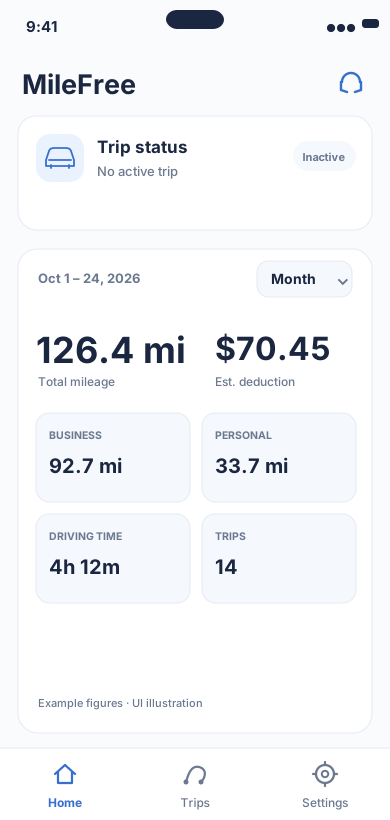
Current mileage and tracking status.
Flutter UI: HomeScreen / SummaryCardOpen larger preview ↗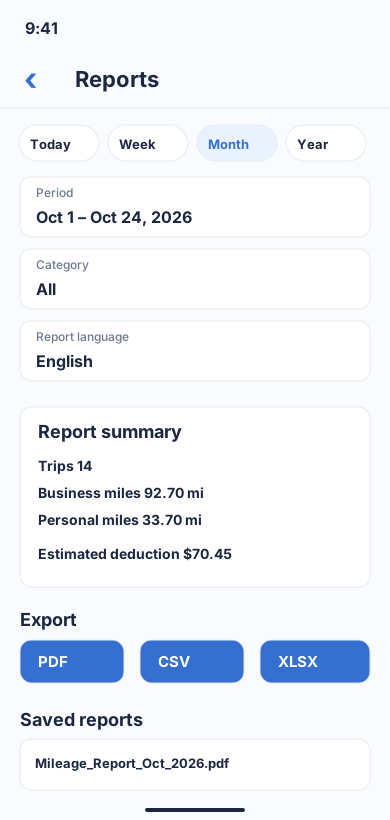
Choose a period and category, review business/personal totals, then download a report in PDF, CSV or XLSX format.
Flutter UI: ReportBuilderScreenOpen larger preview ↗Illustrative previews based on the app interface, with example data. These are not actual iPhone screenshots; the design may change. Preview text is in English.
MileFree is in public beta. Specific features and behavior may change before the first App Store release. FULL FREE describes our pricing commitment; it does not mean every planned feature is already finished.
But doesn’t software cost money to build?
Of course it does. Development, testing and support all take time and money. We are not saying that building MileFree costs nothing. We are saying that we have chosen not to pass those costs to drivers through a Premium tier or subscription.
MileFree also takes a local-first approach to its main driving records. In the current build, core trip, odometer and preference data stays on the iPhone, and ordinary tracking does not require a MileFree account or cloud synchronization of your main mileage history. That approach respects privacy and avoids unnecessary cloud processing.
What FULL FREE does not mean
It is not a promise of flawless GPS tracking. iPhone permissions, battery settings, background behavior and location conditions can affect automatic trip detection. You should always review your mileage history, particularly when using it for work or reimbursement.
It also does not mean MileFree has already launched in the App Store. The iPhone app is currently available for public beta testing through Apple TestFlight; the first App Store release is still being prepared.
Want to compare the options? See our source-linked guide to free mileage tracking plans, including MileIQ, Everlance, TripLog, Driversnote and Stride. We explain what is free, what is limited, and why MileFree is still labeled as a public beta.
A few straightforward answers
Will MileFree start charging after 30 or 40 trips?
No. We are not building a monthly trip counter that forces you into a paid plan.
Is FULL FREE a seven-day trial?
No. There is no planned trial expiration, Premium tier or subscription for the mileage app.
Will reports require an upgrade?
No paid reporting tier or report unlock is planned. Feature availability in the beta can still evolve.
Can I try MileFree now?
Yes, the iPhone public beta is available through Apple TestFlight. The App Store launch is a separate milestone.
No small print that turns a free mileage tracker into a monthly bill. If a mileage feature requires a paid upgrade, we would not call the app FULL FREE.