Mileage Tracking Apps Compared: Free Plans and Real Limits
Compare mileage tracking apps by free automatic recording, CSV and PDF access, supported devices and real limits. We link to each provider’s own documentation.
· MileFree
Disclosure: This comparison is published by MileFree, one of the products listed. It is not an independent ranking. We do not claim to have conducted head-to-head GPS accuracy tests. Plans can change; follow the source links to confirm current terms.
What is actually free?
The most useful comparison is about the free plan, not the cost of downloading an app. A trip allowance, reporting limit or annual pass can matter more than the words “Free” or “Premium” on a store listing.
| App | Free tracking & limits | Free reports (CSV / PDF) | Platforms | Official sources |
|---|---|---|---|---|
| MileFree | No app-imposed monthly trip capFULL FREE commitment: no subscription or paid feature unlock. Public iPhone beta via TestFlight; not yet an App Store release. | PDF, CSV and XLSX exports: free in the current public beta; test your own files. | iPhone · TestFlight beta | |
| MileIQ | 40 classified drives/month on its free Limited planIts help article says only the first 40 classified drives per month can be viewed on the free plan. | PDF and CSV formats are documented. The Limited plan allows viewing only the first 40 classified drives per month; free-plan export scope is not independently verified. | iOS · Android | |
| Everlance | 30 automatically detected trips/month; unlimited manual trackingThe free Basic plan includes unlimited CSV exports. Advanced PDF reporting is offered on paid plans. | Basic: unlimited CSV export. PDF and Excel formats require paid Starter or Professional. | iOS · Android | |
| TripLog | Unlimited automatic mileage tracking in the free Basic mobile appExpanded web access and unlimited reporting are available through one annual 7-day Premium Pass. | Basic: an emailed report for the last 7 days. Unlimited/custom reports and web PDF need the annual 7-day Premium Pass or a paid plan. | iOS · Android | |
| Driversnote | 15 trips/month on the free planThe free plan restricts reportable trips; Pro supports unlimited tracking and reporting. | PDF and Excel report formats are listed for Free, limited to 15 trips per month; unlimited reporting requires Pro. | iOS · Android | |
| Stride | Free tracking, started manually for each driveThe official help center says tracking does not start on its own. The iOS app can remind drivers to start. | Free mileage report in CSV and tax summary in PDF. Tracking does not begin automatically: you must start each drive. | iOS · Android |
Source check: November 15, 2026. The table separates automatic detection from manual recording and free exports from paid report formats. “Not independently verified” means the cited source does not establish the free-plan condition. Plans can change.
How we researched this comparison
MileFree publishes this article and is one of the six apps compared. We checked providers’ official free-plan documentation, not independent app tests. We did not run all six products on the same iPhone or measure GPS accuracy, battery drain, missed trips, or actual exports. We do not claim a winner on those measures. Learn about MileFree.
Choose a free mileage tracker for the way you drive
| Your situation | App worth considering | Why and what to check |
|---|---|---|
| Unlimited automatic recording, no payment | TripLog Basic | Its Basic mobile plan offers unlimited automatic tracking; extended reporting and web access use an annual Premium Pass. |
| Unlimited manual trips and CSV exports | Everlance Basic | Unlimited manual recording and CSV; automatic detection capped at 30 monthly drives. |
| Occasional drives | MileIQ Limited | Free plan lets you view up to 40 classified drives per month. |
| Up to 15 reported trips monthly | Driversnote Free | Automatic tracking available; reports limited to 15 trips on Free. |
| Mileage and expense management | Stride | Describes its tracker as free; confirm its current features and reporting workflow. |
| No premium tier or export paywall | MileFree FULL FREE | Public iPhone TestFlight beta, not a finished App Store release. Verify the beta fits your routine. |
Three real-world situations to check
Service technician
Drive to a customer, stop for parts and visit another job. Confirm the separate trips, distances and business purpose.
Delivery driver
With frequent stops, confirm short drives appear correctly and ask whether a full month can be exported without paying.
Self-employed professional
Review trip dates, destinations and purpose before year-end. Recorded mileage alone does not prove tax deductibility.
Not every competitor charges for every useful feature
Stride provides free tracking but requires the driver to start recording. TripLog Basic offers unlimited automatic recording with limits on reports; Everlance Basic includes unlimited manual trips and CSV export. MileFree is not the only free option, so compare actual limits.
How to choose a mileage tracker
Automatic versus manual
Check whether recording begins in the background or needs Start/Finish. Test your own iPhone permissions and battery settings.
Monthly trip limits
Look separately for a cap on detected trips, saved trips, classified trips and trips eligible for reports.
Exports and history
Confirm whether you can access and export the dates, distances, classifications and notes you need without paying.
Accuracy and correction
Compare recorded GPS distance with your vehicle’s odometer over repeatable routes. Review missing trips before relying on the log.
Privacy and total cost
Review cloud-account requirements, location-data handling, subscription terms and whether the provider offers other services.
What FULL FREE means for MileFree
MileFree is designed to keep its mileage-tracking features free without a Premium plan, recurring subscription, trip quota or paid export unlock. The current app is still a public iPhone beta; features and behavior may change before the first App Store release.
MileFree features shown in this article
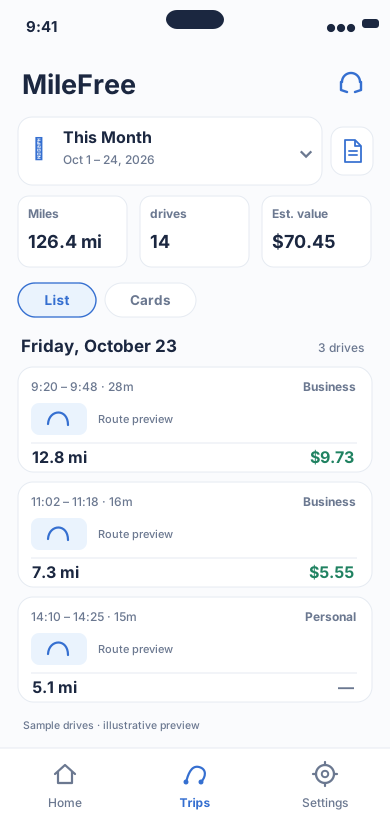
Date range, miles, drives and reviewable trip history.
Flutter UI: HistoryScreenOpen larger preview ↗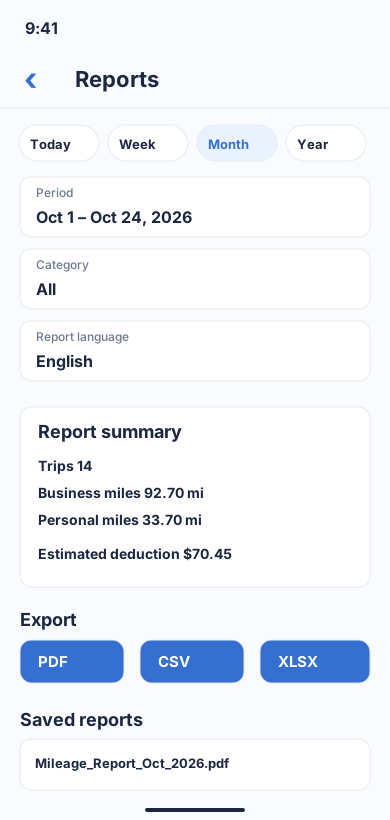
Choose a period and category, review business/personal totals, then download a report in PDF, CSV or XLSX format.
Flutter UI: ReportBuilderScreenOpen larger preview ↗Illustrative previews based on the app interface, with example data. These are not actual iPhone screenshots; the design may change. Preview text is in English.
We have not declared an accuracy winner
No independent, controlled GPS-versus-odometer comparison of these six apps is provided here. We will not label any product the “most accurate” without a documented test method, identical routes and published results.
Privacy is part of the comparison
The current MileFree beta is designed to store core mileage records on your iPhone without a mandatory MileFree account. This is not evidence that other apps are less private. Review each provider's privacy policy, cloud-sync requirements and the information revealed by exported trip reports.
Evidence and limitations
Checked against official documentation
Free-plan limits, access to reports and the providers’ published terms, with links for each app.
Illustrations, not screenshots
The MileFree interface previews here are illustrations, not actual iPhone captures; route examples are not GPS test measurements.
Not independently tested
No measured GPS-versus-odometer accuracy, missed-trip rate, battery consumption or head-to-head report-quality results.
How to make a fair field test
- Record the same route several times with the same phone, iOS and permissions; note odometer readings.
- Record starts, stops, missing or duplicated trips and do not hide errors.
- Classify identical business and personal journeys and export the same date range on each free plan.
- Measure battery use under comparable conditions, publish raw data and genuine screenshots before naming a winner.
US mileage records and taxes
Mileage apps organize records; they do not decide whether a trip qualifies as a tax deduction. Commuting and other personal miles may not qualify. Check IRS Publication 463 and consult your tax adviser before using an app-generated record on a return. IRS Publication 463 ↗
Frequently asked questions
Is MileFree already in the App Store?
No. As of November 9, 2026, the iPhone public beta is available through Apple TestFlight. The first App Store launch is still being prepared.
Is Everlance completely unusable without paying?
No. Its Basic plan provides 30 automatic trips each month, unlimited manually tracked trips and unlimited CSV export.
Can I track unlimited drives for free in TripLog?
TripLog says its Basic mobile plan includes unlimited automatic mileage tracking. Reporting and web access have separate conditions.
Does FULL FREE mean GPS tracking is guaranteed to be perfect?
No. GPS, motion sensors, iOS permissions and background behavior can affect any trip tracker. Always review saved trips.
Original sources and verification
Product terms and report formats were checked against provider documentation on November 15, 2026. This comparison is published by MileFree. Features may change; verify the linked plans.
Related mileage guides
Try a different approach to mileage tracking
MileFree is building a fully free mileage tracker for iPhone. Explore the public beta and decide whether it fits your driving routine.
Try the MileFree iPhone beta