An appliance technician is rarely driving between two fixed offices. One morning might start with a refrigerator that is not cooling. After checking the evaporator fan and temperature readings, the technician needs a replacement part and stops at a supplier. The next appointment is a dishwasher repair. Before heading home, a customer calls about a previous job and the schedule changes again.
When every extra stop is a separate drive, mileage tracking for appliance repair technicians becomes a record-keeping problem. Recording mileage is easy in principle; remembering every five-mile trip after a busy day is not. That is the problem MileFree is designed to help solve.
A normal repair day is a multi-stop route
Repair calls have different purposes: initial diagnosis, installation of a replacement part, a return visit after shipping, a second-person job, a warranty callback or a trip to obtain a specialized tool. The distance between those jobs is often more meaningful than a rough home-to-home estimate.
Think of the sequence: home → refrigerator diagnostic visit → parts distributor → washing-machine appointment → return to the first customer → home. A practical log gives you the timestamp and distance for each drive, so you can review what happened without rebuilding the entire day from memory.
Good records are also useful when the work schedule changes. The original trip should remain available for review; its mileage should not disappear just because you later adjust whether it was Business or Personal.
Parts runs and return visits are easy to miss
A technician may have an appointment on the calendar but not the stop at a parts counter that happens between appointments. Those unplanned drives can be short, repeated and easy to forget. A separate record of each segment makes it easier to find a particular parts run later.
Some repairs require a second visit after a component arrives. Others need the technician to come back with a second person to move a heavy appliance safely. Those return drives happen on different days. A dated history is more useful than simply writing down the week's odometer difference.
For more general job-site workflows, see our field service mileage guide. If your work also involves installing equipment, estimates or supply runs, our contractor mileage guide covers those scenarios.
Automatic recording should fit your workday
MileFree is being developed to recognize driving through iPhone location and motion signals when automatic tracking and the required iOS permissions are enabled. The idea is simple: the app handles the recording while you focus on diagnoses, customers and repairs, instead of asking you to tap Start before every stop.
Manual Start and Finish are still valuable. GPS accuracy changes in parking garages, dense city streets and weak-signal areas. iOS can also limit background execution. No tracking app can promise that every drive will be perfect in every condition, so the ability to review trips and use manual controls matters.
Learn about the setup in Automatic Mileage Tracker for iPhone and the iPhone permissions guide.
Use one vehicle, but separate Business and Personal
The same car may be used for customer appointments, a personal errand, and the drive back home. You need a way to review all those trips while separating Business from Personal mileage. MileFree provides those categories and summaries, letting you organize the recorded history for the period you choose.
For example, going from an appliance repair to a grocery store for personal shopping does not automatically turn into business driving just because it happened after a service call. The recorded route and its business purpose are different pieces of information. A mileage app should help you classify a trip, not decide your tax eligibility.
See Business Mileage Tracker for date filters, categories and the way commute adjustments are handled.
Does the drive from home to your first customer count?
This is one of the most important distinctions for a self-employed appliance technician in the United States. The IRS generally treats regular commuting as nondeductible, including some home-to-first-contact and last-contact-to-home drives. Exceptions may apply, particularly when a qualifying home office is the principal place of business or when certain temporary-workplace rules apply.
That means there is no universal rule saying every home-to-customer trip qualifies as business mileage. Keep the original trip record, review the purpose and circumstances, and consult the applicable rules before using the totals on a tax return.
Official reference: IRS Publication 463 — Transportation expenses. This article offers mileage-log guidance, not tax advice.
What should a technician's mileage history include?
At the end of a service day, a useful app should let you look at the recorded trips in order. Date, time, distance, route details, Business or Personal classification and summaries for a selected date range are the basics. You should be able to review Monday's supplier drive without guessing which appointment came before it.
Privacy matters as well. A service technician's route can expose customer addresses and repeating work patterns. In the current MileFree build, core trip, odometer and preference data is stored locally on the iPhone, and normal tracking does not require a MileFree account or cloud synchronization of those primary records.
Enable automatic tracking with the necessary permissions, or use manual Start and Finish.
Look over each leg between customers, parts stores and return visits.
Keep Business and Personal trips organized without overwriting the original record.
Choose a week or month and review the mileage summary; verify applicable tax treatment separately.
A mileage tracker should not become another service bill
Fuel, parts, tools, insurance and vehicle upkeep already cost money. MileFree is planned as a completely free mileage app without a Premium tier, subscription or monthly trip cap. Automatic and manual trips, history, Business / Personal classification, mileage summaries and odometer tools are intended to be free.
MileFree is available for public iPhone beta testing through Apple TestFlight; the first App Store release is still being prepared. We are not claiming that every background drive has already been validated across all iPhones. The aim is to build reliable tracking and test it under real driving conditions, with manual controls and reviewable records available.
Built for people who work between appointments.
Capture service-call mileage, check trips later and keep your core data on your iPhone.
Explore MileFree features →Questions appliance technicians ask
Does a trip to pick up a refrigerator part belong in my mileage log?
Record the trip so you have the details. Whether it is qualifying business mileage depends on why you drove and the rules relevant to your circumstances. A parts run for a job may be business transportation, but you should review it before using tax totals.
What if I need to come back after a part is delivered?
A separate drive on the return date belongs in your trip history. Keeping those records by date helps you distinguish the initial diagnosis from the later repair.
Can I use MileFree without a subscription?
That is the product commitment: the complete mileage app is planned to be free, with no Premium tier, subscription or monthly trip cap. The public iPhone release is being prepared.
MileFree features shown in this article
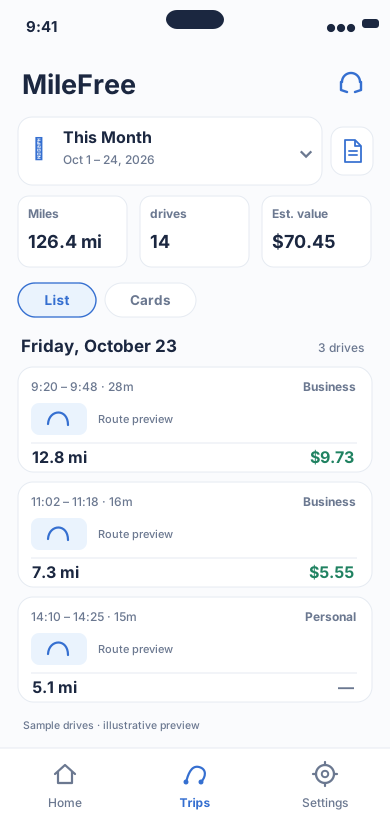
Date range, miles, drives and reviewable trip history.
Flutter UI: HistoryScreenOpen larger preview ↗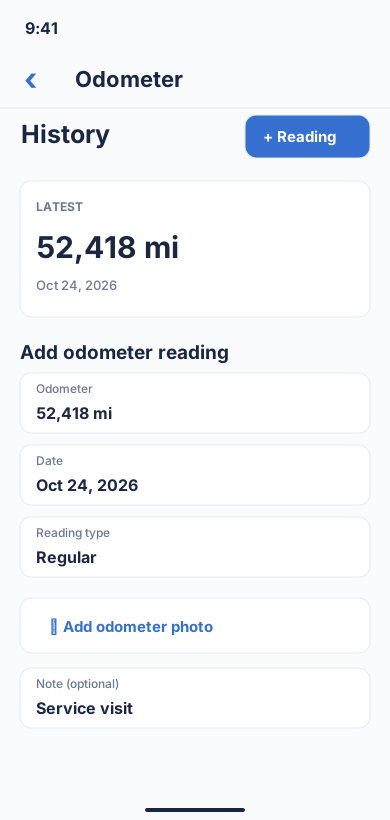
Odometer history and readings.
Flutter UI: OdometerHistoryViewOpen larger preview ↗Illustrative previews based on the app interface, with example data. These are not actual iPhone screenshots; the design may change. Preview text is in English.