
Field service work creates a mileage problem that looks simple until the day gets busy. A technician may leave home, drive to a customer, stop for a part, continue to another appointment, return to a supplier and finish at a final job. Remembering every segment at the end of the day is easy to get wrong.
A useful mileage tracker for field service technicians should reduce that memory work. It should help capture drives, keep work mileage separated from personal driving and make the history easy to review later.
Why field service mileage is easy to miss
Technicians do not spend the day thinking about mileage. They are thinking about arrival windows, diagnostics, parts, customer messages and the next appointment. That is exactly why manual mileage notes can become inconsistent.
The challenge is not one long business trip. It is a chain of shorter drives. A normal workday can include customer-to-customer travel, supply-house stops, return visits and personal driving mixed into the same day.
The best workflow is the one that asks for the least attention while the technician is working.
Automatic mileage tracking matters more on multi-stop days
Automatic trip recording can remove the need to remember a Start button before every service call. In MileFree, automatic tracking is designed around iPhone Location and Motion & Fitness permissions when the feature is enabled.
Manual Start and Finish controls still matter as a backup. A field technician should be able to take control when needed instead of depending on only one tracking method.
The goal is simple: let the mileage history build while the technician focuses on the job.
Business and Personal mileage should stay easy to separate
Not every drive belongs in the same category. A technician may have work appointments during the day and personal driving before, after or between them.
MileFree keeps Business and Personal mileage as separate classifications inside the same trip history. That makes it easier to review the day without maintaining two different logs.
Classification should remain editable because real workdays are messy. A trip that looks like work mileage at first may need to be changed after review.
A mileage log should make many stops understandable
A useful field service mileage log should answer basic questions quickly: What trips were recorded? How far was each drive? How much of the period was Business mileage? How much was Personal? How many trips were made?
MileFree is built around a trip history and date-based summaries so the user can review a day, week or longer period without reconstructing it from memory.
Odometer history adds another reference point for drivers who want to keep periodic vehicle readings alongside recorded trips.
Review should come after the driving, not during it
During a service day, the important job is capturing the drives. Review can happen later when the technician is no longer moving between appointments.
MileFree keeps recorded trips in history and provides date-based summaries so mileage can be reviewed by period without reconstructing the day manually.
Business / Personal classification, driving time, trip count and commute adjustments stay connected to the underlying trip history so the totals remain understandable.
What to record for each customer drive
For a field service technician, a trip history is most useful when each leg can be linked back to a job. After a busy day, check the date, start and end points, distance and business purpose. A customer invoice, dispatch appointment or parts receipt can help explain why you made that trip.
Example (illustrative, not a measured MileFree trip): 9:00 AM customer A → 9:25 AM parts supplier, 8.4 miles, reason: replacement part pickup. A second trip from the supplier to customer B should have its own purpose, distance and time. A personal errand should not be relabeled as business simply because it happened between calls.
For U.S. deductions, a tracking app does not itself establish eligibility. Review the IRS guidance on business transportation and records, including commuting rules. Our self-employed mileage guide also explains the midyear 2026 mileage rate change.
Driving history deserves privacy
A field technician's driving history can reveal customer locations, work patterns and repeated destinations. That information should not move to another service unless the app actually needs it.
In the current MileFree build, core trip, odometer and preference data is stored locally on the iPhone. A MileFree account is not required for normal use, and the current build does not include cloud synchronization for core mileage records.
This is part of the same product idea as the rest of MileFree: Easy. Free. Safe.
A simple field-service mileage workflow
Let automatic tracking record trips when enabled, or use manual controls when needed.
Check the recorded trips after the service day instead of writing every segment by hand.
Keep Business and Personal mileage organized in one history.
Review mileage summaries for the period you need.
A field service mileage tracker does not need to become a full dispatch or accounting system. It needs to do one job reliably: help keep an understandable record of the driving that happens between the work.
Built to keep mileage tracking out of the technician's way.
MileFree's first App Store release is still being prepared, and public iPhone beta testing is available through Apple TestFlight. The entire mileage app is planned to be free, with no Premium tiers, subscription or monthly trip cap. The current build keeps core trip data locally and does not require a MileFree account for normal use.
MileFree features shown in this article
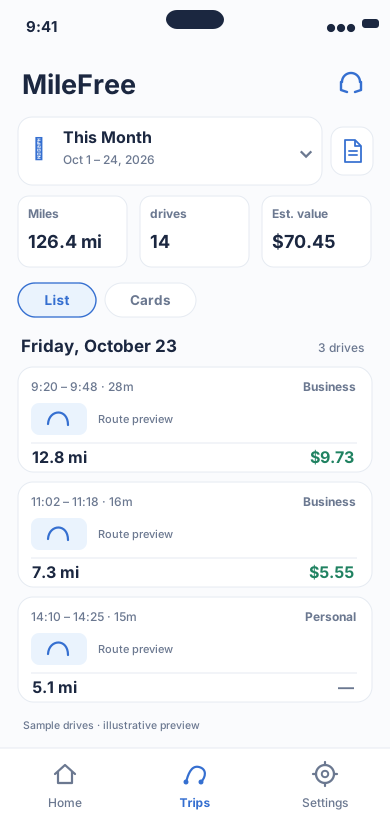
Date range, miles, drives and reviewable trip history.
Flutter UI: HistoryScreenOpen larger preview ↗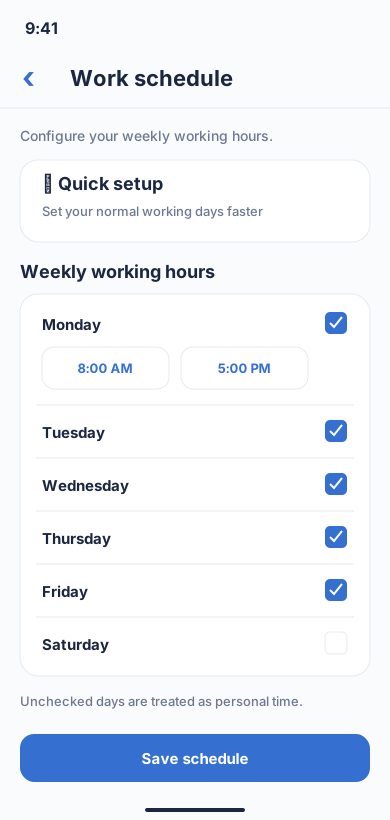
Weekly work hours used by tracking settings.
Flutter UI: WeeklyScheduleScreenOpen larger preview ↗Illustrative previews based on the app interface, with example data. These are not actual iPhone screenshots; the design may change. Preview text is in English.