
There are already many mileage tracker apps. MileFree is not being built just to add one more name to that list.
The goal is much simpler: build a mileage tracker for iPhone that people can use every day without having to think about the app itself.
It should record drives when tracking is enabled. It should keep Business and Personal mileage organized. It should make history and summaries easy to review. And it should do that without forcing the user into a complicated workflow.
A mileage tracker should feel like a utility.
You do not open a mileage tracker because you want another dashboard to manage. You open it because you need a dependable record of where the miles went.
MileFree is being built around that basic job. The product direction is deliberately focused: automatic and manual trip recording, Business and Personal classification, useful history, mileage summaries and odometer records.
That is also why the MileFree slogan stays simple: Easy. Free. Safe.
Free should be genuinely useful.
MileFree's first App Store release is planned as a completely free iPhone app. There will be no Premium or Pro version, subscription or monthly trip limit in the planned mileage app.
The current build is centered on the features needed for everyday mileage tracking: automatic and manual trip recording, Business and Personal mileage, date-based summaries, trip history and odometer history.
The feature set can still evolve before launch, but the direction is clear: MileFree should be useful before the user ever has to think about paying for anything.
Reliable tracking comes before extra features.
A mileage tracker is only useful if it records the trips you expect it to record. That is why reliability is one of the main priorities for MileFree.
The current work is focused on real-world iPhone behavior: background tracking, movement detection, automatic trip start and stop, trip persistence and recovery when normal phone conditions are not perfect.
Manual Start and Finish controls are also part of the workflow. Automatic tracking should do most of the work, but the user should still have a clear manual option when needed.
MileFree is not claiming perfect tracking before public testing. It is being built and tested with reliability as a core requirement rather than an extra feature added later.
Your mileage history should stay private.
Driving history can reveal where someone goes, when they travel and how often they visit certain places. That makes privacy especially important for a mileage tracker.
In the current MileFree build, core trip, odometer and preference data is stored locally on the iPhone. A MileFree account is not required for normal use, and the current build does not include cloud synchronization for core mileage records.
The MileFree website uses standard website analytics, but website measurement is separate from the mileage data stored by the app.
The principle is simple: collect and move less data when the app does not need to.
Easy means fewer steps, not fewer useful features.
A driver should not need a tutorial every time they want to check mileage. MileFree is being designed so the important information is visible quickly: current trip status, mileage totals, Business and Personal mileage, trip count, driving time and history.
The app is not trying to become an accounting suite, fleet-management platform and expense system all at the same time. The focus is mileage tracking.
That narrower focus makes the product easier to understand and easier to use on the road.
Record. Review. Classify. Check totals.
The MileFree workflow is intentionally short:
Automatic trip recording when enabled, with manual Start / Finish controls available when needed.
Open trip history and see dates, mileage and driving time without digging through multiple screens.
Keep Business and Personal mileage separated inside the same app.
Review mileage summaries for the period you choose.
For contractors, field technicians, delivery drivers, self-employed workers and anyone who drives for work, that basic workflow is the product.
MileFree features shown in this article
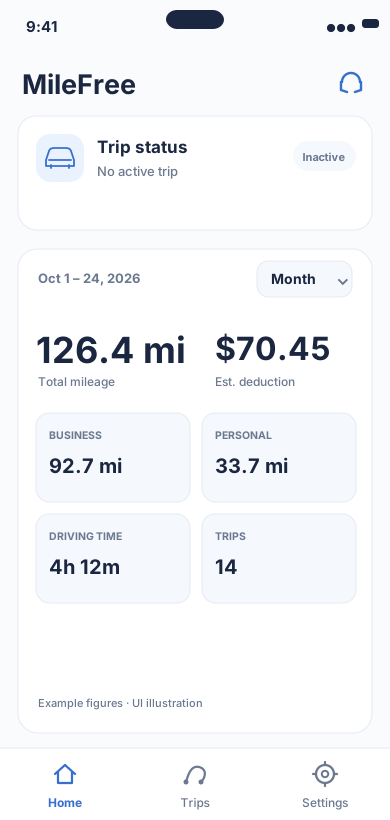
Current mileage and tracking status.
Flutter UI: HomeScreen / SummaryCardOpen larger preview ↗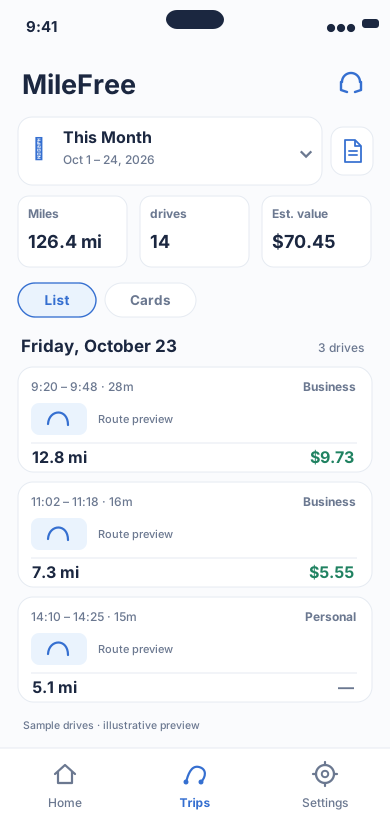
Date range, miles, drives and reviewable trip history.
Flutter UI: HistoryScreenOpen larger preview ↗Illustrative previews based on the app interface, with example data. These are not actual iPhone screenshots; the design may change. Preview text is in English.
What is coming
MileFree is available for public iPhone beta testing through Apple TestFlight while its first App Store release is being prepared. The current focus is not adding hundreds of features. It is making the important ones work well.
That means dependable automatic trip recording, clear Business and Personal mileage, useful history and summaries, local storage for core mileage data and an interface that does not get in the driver's way.
Free. Reliable. Private. Easy.
That is the product MileFree is being built to become: a mileage tracker that quietly does its job, keeps your core mileage records organized and gives you the information you need when you need it.
Why the original “mileage tracker killer” idea?
Not because MileFree needs to copy every feature from every other tracker. The challenge is simpler: make the basic mileage experience good enough that drivers do not feel they need something more complicated.
Easy. Free. Safe. That is where MileFree starts.